
Appearance
Product overview
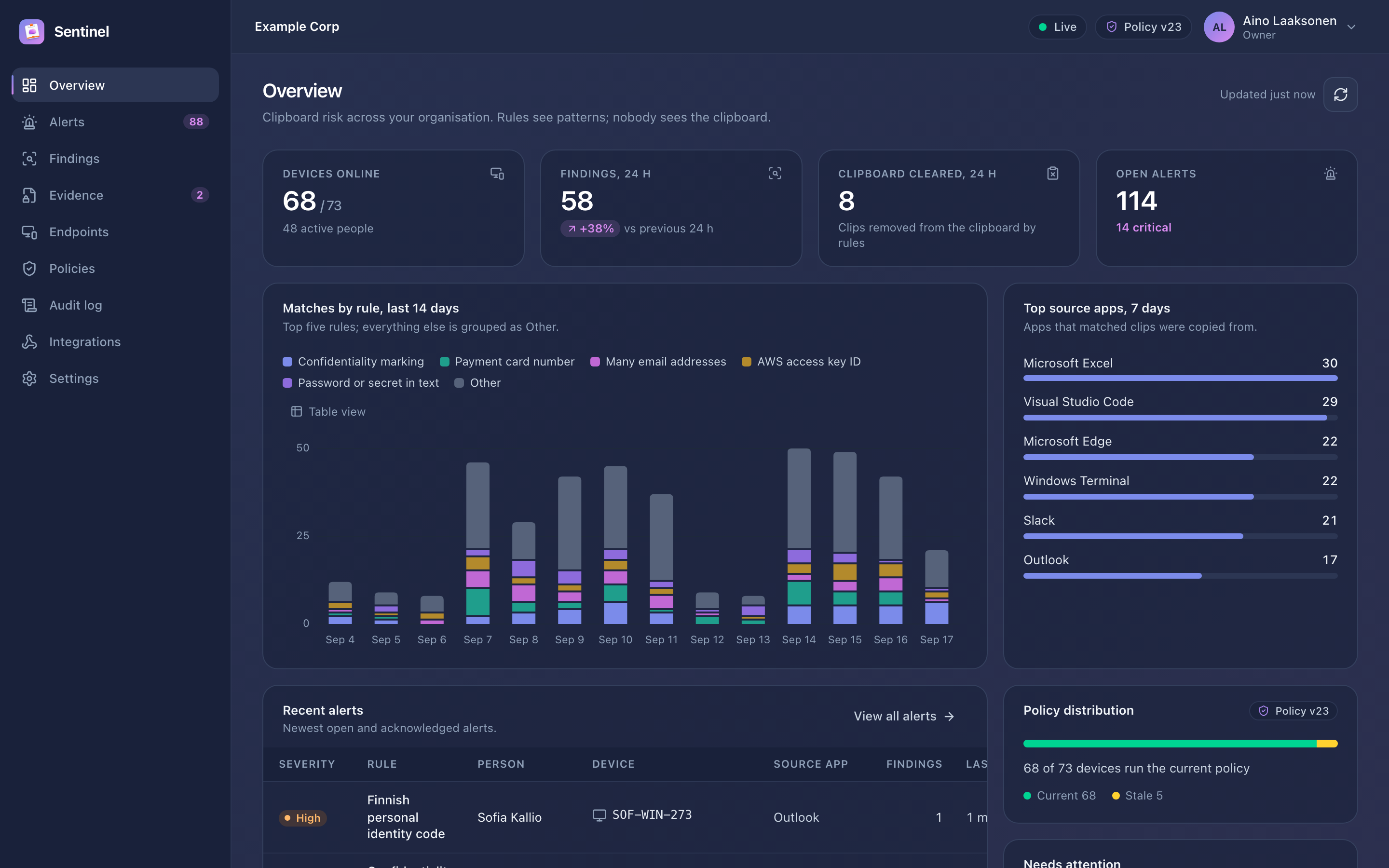
Klipsu Sentinel is the server your organisation runs for its Klipsu users. It keeps clipboard sync inside your infrastructure and shows your security team when sensitive data passes through the clipboard, without reading anyone's clipboard.
The clipboard is a blind spot
Employees copy API keys, database passwords, customer records and confidential documents every day. They paste them into chat tools, tickets and AI assistants. Traditional DLP watches email, file transfers and web uploads, but the clipboard is rarely covered. Kernel-level agents are intrusive and hard to justify to employees.
Klipsu is a clipboard manager that syncs clipboard history between an employee's devices with end-to-end encryption. Klipsu Sentinel does two things for organisations:
- Keeps clipboard sync inside your infrastructure. Enrolled devices sync through your Sentinel instead of Klipsu's cloud. History stays end-to-end encrypted with keys that only the employee's devices hold, so Sentinel stores ciphertext it cannot read.
- Detects sensitive data leaving through the clipboard. Your security team defines rules in the Sentinel console. The Klipsu app checks copied text against the rules on the device and reports a finding with a masked match (for example
AKIA••••••••••••7Q2F). Findings become alerts for triage and can be forwarded to your SIEM, a webhook or Slack.
What makes it different
| Klipsu Sentinel | |
|---|---|
| Clipboard content on the server | Never. Sync data is end-to-end encrypted; detection runs on the device. |
| What security sees | The rule, a masked match, the source application, device, person and time. |
| Evidence when an incident needs it | The device keeps the matched clip sealed to your organisation's evidence key for the rule's retention period. An investigator requests it with a written reason; only someone holding the evidence passphrase can open it; every step is audited. |
| Employee transparency | Devices show that they are managed and what is reported, and can notify employees when evidence is requested. |
| Deployment | One binary for Linux or Windows plus PostgreSQL. No cloud dependency; works in isolated networks. |
| Tamper evidence | Every administrative action goes into a hash-chained audit log that the console verifies. |
Capabilities
Detection
- 24 built-in detectors: cloud and AI API keys, access tokens, private keys, database credentials, payment cards, IBANs, Finnish and Swedish personal identity numbers, US Social Security numbers, bulk email addresses, confidentiality markings and more.
- Custom regular expressions with validators (Luhn, IBAN, entropy and others), keyword lists, and document fingerprints that recognise excerpts of confidential documents.
- Per-rule masking: full, partial, format-preserving, email-style, keyed hash or redaction.
- Actions on the device: report, notify the employee, clear the clipboard, exclude the clip from sync.
- Scoping by group, platform and source application, with a test bench that runs rules exactly as devices do.
Response
- Alerts with grouping, severity, triage workflow, assignment, comments, bulk actions and live updates.
- Evidence investigations: request, device upload, passphrase-protected opening with a recorded purpose, expiry and cancellation.
- Integrations: signed webhooks, syslog (RFC 5424 JSON or CEF over UDP, TCP or TLS) and Slack, with retries.
Administration
- People, devices, groups and enrollment codes: shared, domain-restricted or personal codes, plus MDM configuration.
- Roles (owner, admin, analyst, auditor), two-factor authentication (optionally required for everyone) and pseudonymisation of people for analysts.
- Retention settings, signed policy versions, key rotation and audit log export.
Roles
| Role | Typical person | Can |
|---|---|---|
| Owner | CISO, IT lead | Everything, including owners, keys and license |
| Admin | Security engineer | Rules, endpoints, integrations, settings, admins |
| Analyst | SOC analyst, investigator | Triage alerts, request and open evidence |
| Auditor | Internal audit, DPO | Read everything, verify and export the audit log; no changes |
See Signing in and roles for the full permission table.
Requirements
- Linux (x86-64 or ARM64) or Windows Server 2019+ (x86-64); 2 vCPU and 2 GB RAM for about 2,000 devices.
- PostgreSQL 14 or newer.
- A TLS certificate, or a TLS-terminating reverse proxy.
- Klipsu apps with enterprise mode on the devices. See the release notes for availability.
Details: Requirements.
Licensing
Sentinel is licensed per active person. Without a license it runs in evaluation mode for 30 days with up to 25 people. When a license expires, a grace period (normally 30 days) follows. After that, new devices cannot enroll, while existing devices keep syncing and reporting: licensing never switches protection off.
Next steps
- How it works: the data flows in detail.
- Security and privacy: what the organisation can and cannot see.
- Install Sentinel.